Cedar Grove Apartments
8 yd container · weekly service
- Service window
- 6:30–9:00 a.m.
- Assigned route
- Route 03 · Truck 8
- Truck capacity
- 25 yd body
Planned peak load23 / 25 yd
Transfer stop included before the body limitWaste collection & hauling operations
DynoRoute is waste collection route software that plans and dispatches garbage truck routes around each truck’s capacity, keeps every account on its service cycle, and turns finished stops into QuickBooks-synced invoices.
Your trucks fill up before the miles run out. DynoRoute plans collection routes around what each truck holds — disposal and transfer runs included — keeps every account on its service cycle, and gets what your drivers actually hauled straight onto the invoice.
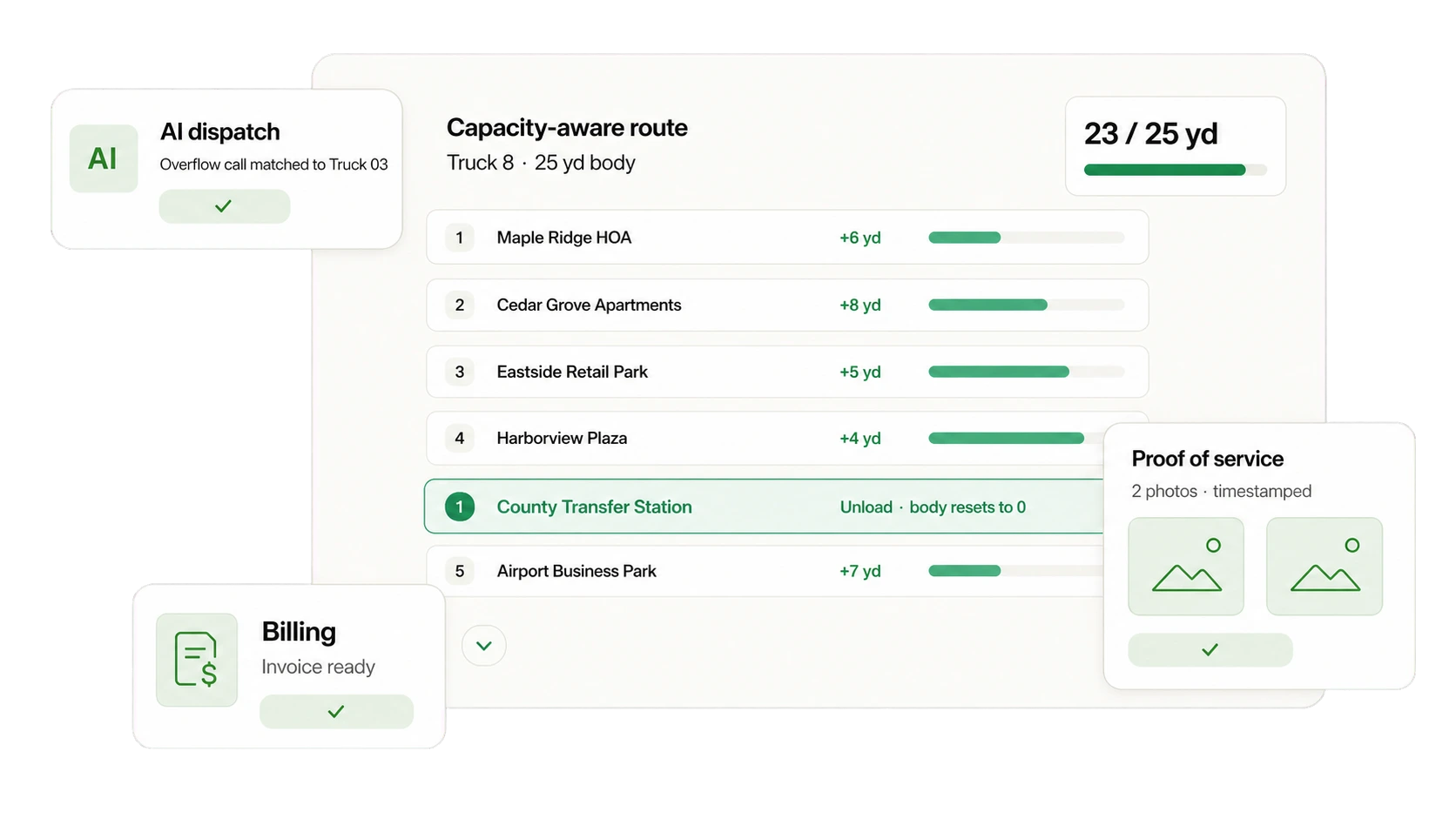
Built for waste collection companies
Every hauler runs differently, and software that fights your rules loses to the whiteboard. Rear-loaders and roll-offs that don’t share a day, the transfer-station tip before the afternoon queue, the overflowing can that has to be worked in this week, billing on what was actually hauled — DynoRoute takes those rules instead of fighting them.
If your operation has a rule, DynoRoute holds it — truck limits, service cycles, restricted roads, custom records, and automations you set up yourself.
One connected workflow
Recurring service, capacity planning, driver proof, and billing stay attached to the same account record — from the first due date to the next.
Put each account's service cadence on the account itself, so every stop coming due lands on a route without anyone rebuilding the week.
Cedar Grove Apartments · weeklyBuild the day around each truck's fill limit, with the disposal or transfer-station return placed where it costs the least drive time.
Route 03 · Truck 8 · transfer stop includedDispatch routes to drivers, watch the fleet live, and replan when a truck fills early or an emergency pickup lands.
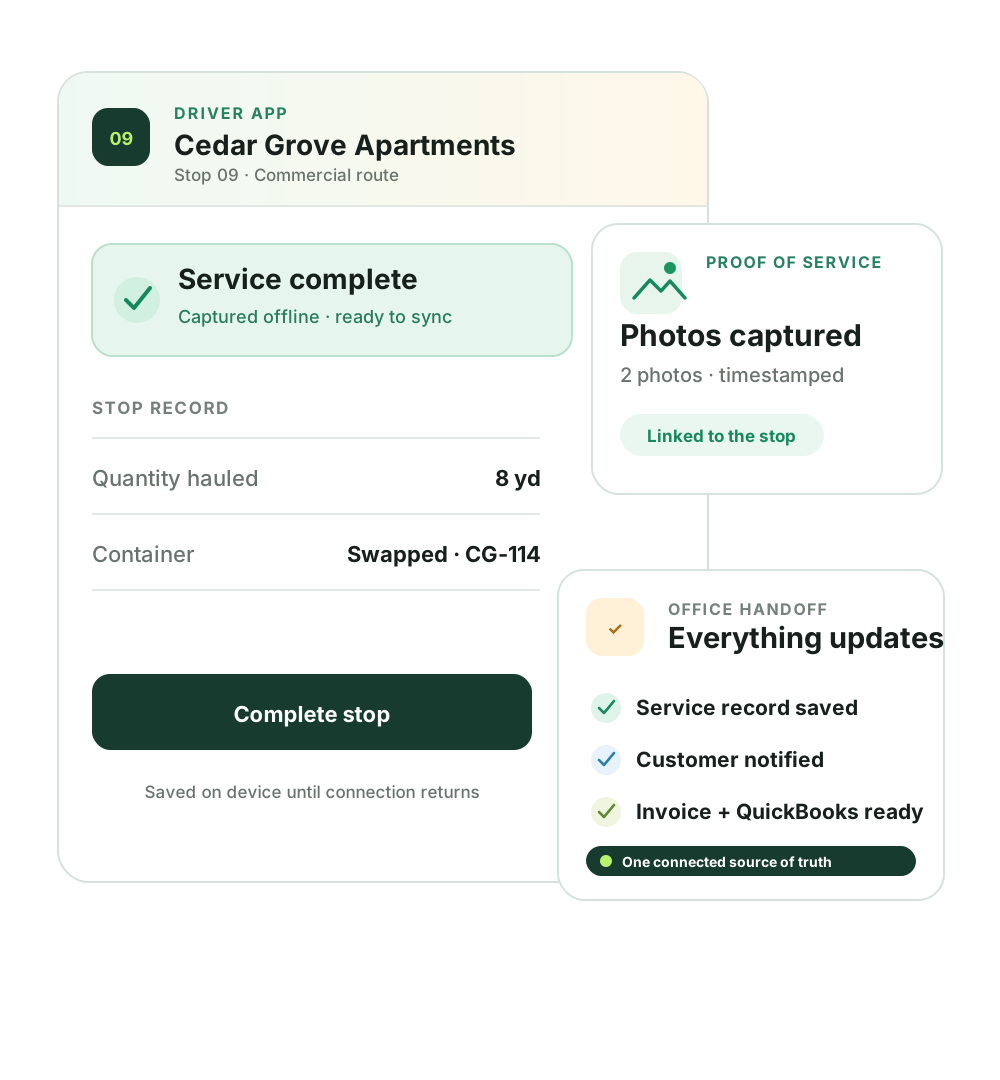
8 yd · 2 photos · exception notedKeep quantities, photos, exceptions, invoices, and account history connected — what the driver hauled is what the invoice says.
Record saved · invoice ready · next service setGarbage truck route planning built around capacity
Most routing software assumes delivery work: the truck leaves full and comes home empty. A collection route runs backwards — every stop adds gallons, yards, bags, or a loaded container toward a hard limit.
Plan a collection day with mileage software and the plan dies at the first full truck: the driver improvises a dump run, the queue eats an hour, and the last stops roll to tomorrow. DynoRoute plans the day in loads — and the trip nobody sells software for, the transfer station with its own drive time, queue, and gate hours, is a planned stop instead of a surprise.
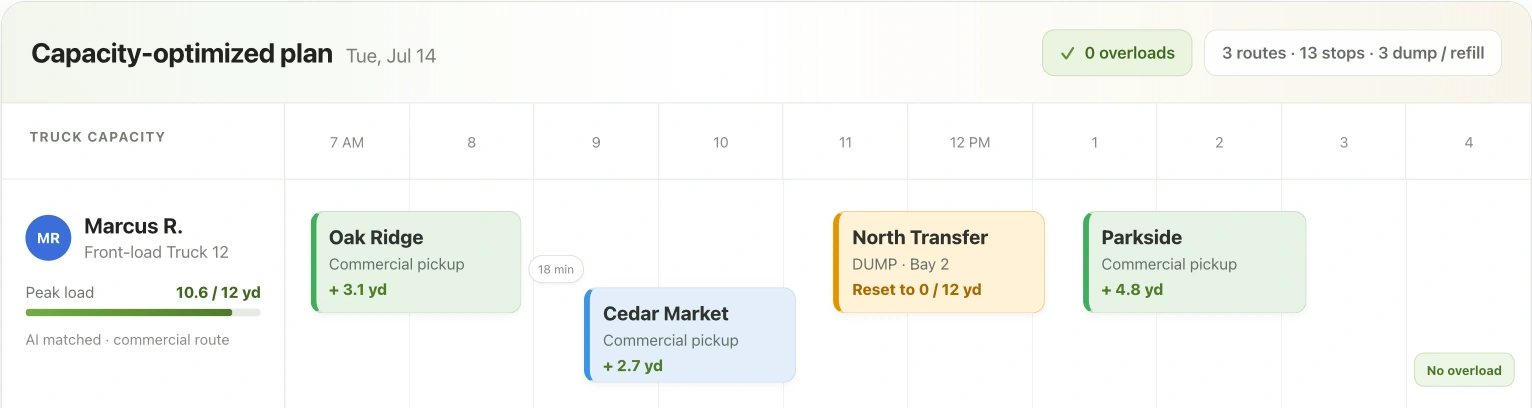
Gallons, pounds, cubic yards, or container slots — routes respect the limit, and stops that would cross it get flagged, not silently overbooked.
Placed where they cost the least drive time, so the truck starts its second load with a plan instead of an apology.
A heavy week, a wet load, a truck that fills two hours early — dispatch replans around the live state of the fleet instead of starting the whiteboard over.
Waste collection business software
DynoRoute connects the operational work around collection, so routing does not become another isolated tool for the office to reconcile.
Recurring route scheduling
A weekly can, a biweekly restaurant, a monthly yard — the cadence lives on the account, and every stop coming due lands on a route, on the right week.
Capacity and multi-trip routing
Set what each truck holds — gallons, pounds, cubic yards, or container slots — and DynoRoute plans within those limits, with disposal and transfer returns built into the day.
AI dispatch and agents
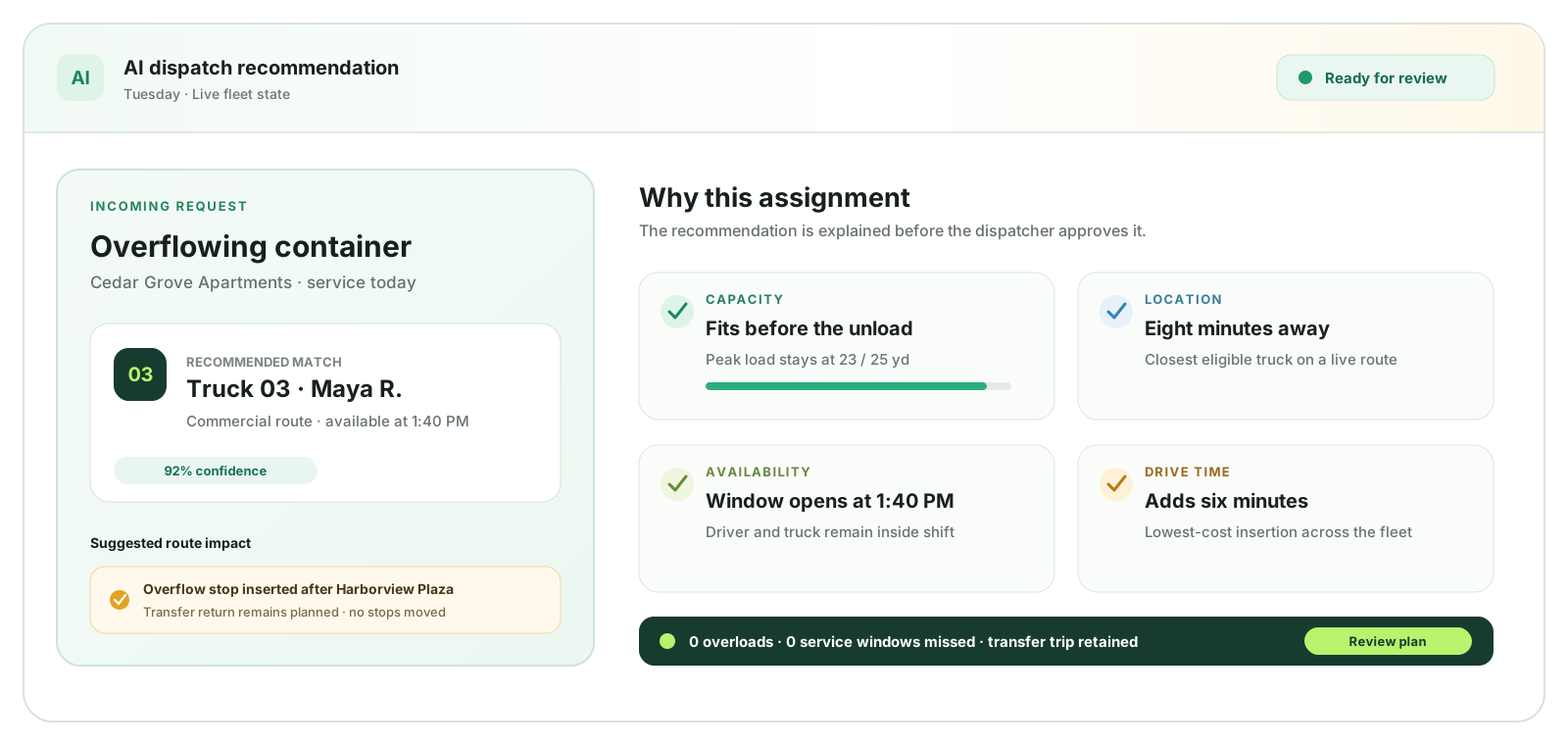
The AI dispatcher matches each job to a truck and driver and states its confidence. Agents you configure watch the day behind it.
Driver app and proof of service
The route lives in the app — stop order, site notes, gate codes, which alley, which can — so a new driver runs it on day one, and proof comes back with him.
Customer, site, and container records
Sites, cans, and containers live as records with the fields you define — custody, gate codes, service history — searchable by the whole company instead of remembered by one veteran.
Billing and QuickBooks
In most shops the same load gets keyed three times — at the stop, on the invoice, in QuickBooks. Here the number the driver records is the number on the invoice.
AI dispatch software for waste fleets
The AI dispatcher matches each job to a truck and driver — by capacity, location, availability, and skills — and states its confidence, so your dispatcher approves a recommendation instead of rebuilding a puzzle. Conflicts surface before they reach a driver.
Garbage truck driver app with proof of service
When the route lives in a veteran’s head, his two weeks’ notice is an operational event. In DynoRoute the route lives in the app — and proof comes back with the driver: photos and quantities captured at the stop, not reconstructed at the yard.
Route software by collection industry
If every stop adds something toward a truck’s limit — or drains something from it — the day has to be planned around when that limit hits. If your dispatcher plans around “how full will truck 2 be by 11 a.m.?”, DynoRoute is built for you, whether or not your trade is on this list.
Pumpout intervals, tank capacity, and receiving-site returns planned as one day.
Tank limits, service cycles, and disposal runs across scattered accounts.
Fill-cycle scheduling, container records, and depot reconciliation.
Materials and compartments, pay-for-oil records, emergency insertions.
Hopper and payload limits with the transfer-station trip planned mid-route.
The rail is the limit — chains of pulls, drops, and swaps that keep it working.
Trucks that empty out — the same capacity math with the opposite sign.
Units, bags, and buildings on recurring nightly rhythms.
From collection operators
Findings from our operator research calls — how collection routes actually run, in the operators’ own words. Research interviews, not customer testimonials.
“It's easy to find routing software to drop stuff off. It's harder to find it to pick stuff up.”
“The routes are really kept in our representatives' heads. Any time they turn over, we start anew.”
“Each stop is about $95 worth of overhead. When three stops fail, we're sending a truck back out — for the same reason it couldn't be done the first time.”
Waste collection route software pricing
Most vendors in this market quote only after a demo. DynoRoute publishes flat monthly plans, so you know the cost before you talk to anyone.
A free route planner can sequence a one-off list of addresses. It won’t hold a fill limit, service cadence, disposal return, or service record — the operating structure a recurring collection book runs on. When the free plan breaks, it breaks at the truck’s limit.
Getting started
The question every vendor page dodges: what does it actually take to switch? Here is the whole answer. Your routes don’t need to be pre-digitized — import the stops, set the limits and cadences, and DynoRoute builds the routes.
CSV in, mapped in minutes — customers, sites, stops, and your custom fields.
Capacity in your unit, shifts, start and end locations, and route rules.
Weekly through monthly service cycles, forms, proof, and automations.
Review the routes, share them to drivers, and follow the day from one board.
No implementation fee. No hardware. No demo required to start — and pricing is published, so you know the cost before you talk to anyone.
Start with your operationWaste collection routing guides
Use the hub to evaluate the software. Use the guides to work through capacity, density, disposal, and dispatch decisions — more publish through August.
Read guide
Read guide
Read guide
Read guide
Questions operators ask
Direct answers about capacity, cost, free tools, municipal fit, getting started, and the day that changes.
It plans, sequences, and tracks collection routes — which stops, which truck, what order, with live GPS, proof of service, and billing behind it. The part that separates tools built for collection from generic route planners is capacity: a collection route has to plan around what the truck holds and the disposal runs that empty it, not just the miles between stops.
Most vendors publish no price and quote after a demo; one legacy tool sells one-time modules that run into four figures. DynoRoute publishes its pricing at dynoroute.com/pricing: flat plans at $199, $499, and $999 per month with credit-based optimization, no per-seat fees, and no implementation fee.
Free route planners sequence addresses, and for a single day of stops they work. They don't hold truck fill limits, recurring service cadences, disposal returns, or per-stop service records — so recurring collection work outgrows them at the first full truck or the first missed cycle. That's the honest line between free and paid here.
DynoRoute is built for private operators — haulers and service companies that run their own trucks, customers, and billing. Municipal street-by-street collection is usually planned as arc routing with procurement-grade tooling, which is a different geometry and buying process. If you're a private fleet serving named accounts, you're in the right place.
Days, not months. Import your customer list from CSV, set each truck's fill limits and each account's cadence, and DynoRoute builds the routes — there's no implementation project, no fee, and no hardware to install. Drivers run their routes on the phones they already carry, offline included.
The plan already carries a buffer and a planned disposal return, so a heavy day flexes instead of breaking. When something bigger changes — a truck down, an emergency pickup, a facility queue — the AI dispatcher replans around the live state of the fleet and shows the dispatcher its recommendation with a confidence score, before anything reaches a driver.
No. The driver app runs on the phones your drivers already carry, works offline and syncs when back in range, and hands turn-by-turn to the navigation app each driver already uses. There are no sensors, telematics contracts, or installs — capacity planning comes from your records and recorded actuals, not hardware.
Reviewed July 30, 2026
Routes that know when the truck is full
Import your stops, set your trucks’ limits and your accounts’ cadences, and compare Friday’s records to what you have today.
Book an intro call