Waste oil collection software

Waste oil collection software that plans the load—not just the stops.

DynoRoute is capacity-based routing and dispatch software for waste-oil collection fleets. Keep tank-aware scheduling, driver records, generator and asset history, customer communication, reporting, and QuickBooks-connected billing in one system.

Plan the day around which tanks are ready, what each stop may add, what the truck can still hold, and where the load must go next. Existing readings can connect through API and webhooks; pickup history keeps the route useful where sensors do not exist.

  • Existing tank readings can connect
  • Works with QuickBooks
  • Published pricing
  • No per-seat fees

Last updated July 31, 2026

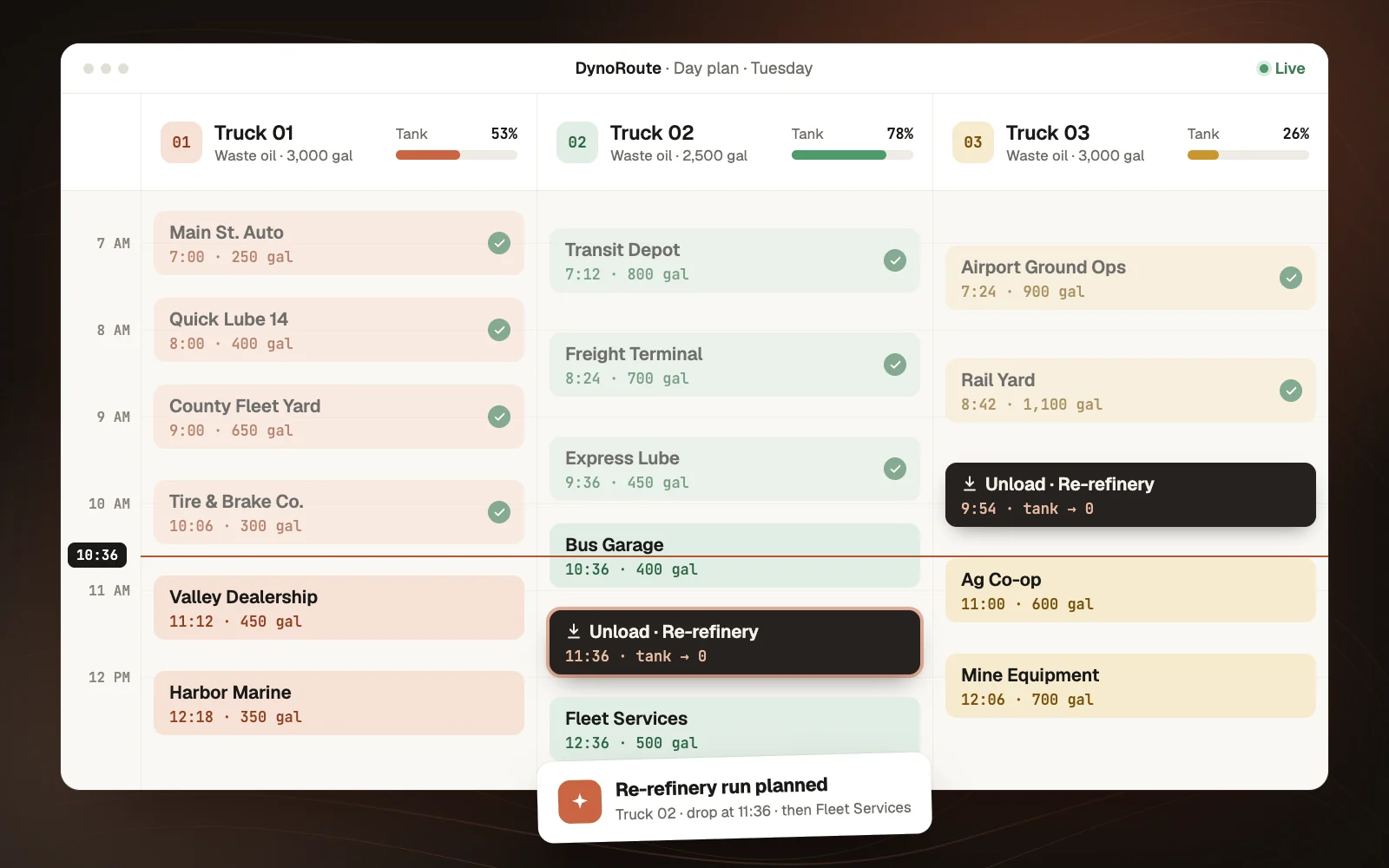
Waste oil route with generator tank readiness, material records, truck capacity, a receiver stop, and acceptance proof

Waste oil route planning software

A used-oil route is a load decision before it is a mileage decision.

A standard optimizer starts with a fixed list of addresses. A waste-oil collector has to decide which generator tanks belong on the truck before sequencing begins.

A route can look efficient and still fail when it visits a half-full tank, accepts an incompatible material, fills early, misses a receiver cutoff, or brings back a quantity with no usable record.

Plan the collection day in this orderThe owner’s decision path
  1. 01Which generator tanks are due, ready, at risk, or already promised?
  2. 02What material and quantity is expected at each stop?
  3. 03Which truck has the compatible equipment and remaining capacity?
  4. 04Where does the receiving, transfer, processing, or offload stop fit?
  5. 05Which accounts are paid, free, or charged for service?
  6. 06What acceptance and delivery record must come back?

DynoRoute keeps those questions in the same operating system as the route. Distance matters, but it comes after readiness, material, capacity, site access, receiver rules, account terms, and the record the business must keep.

Waste oil scheduling and dispatch software

One collection cycle, from tank readiness to delivery record.

Readiness, material, routing, dispatch, driver proof, receiver delivery, reporting, and billing stay attached to the same operating trail.

  1. 01

    Schedule

    Set a recurring cadence for each generator. Keep the tank or drum, last pickup, access window, expected quantity, material stream, customer commitment, and account terms on the stop—not in a representative’s memory. Existing fill-level readings can enter through API and webhooks, while measured pickup history keeps non-sensor accounts useful.

  2. 02

    Plan

    Select the tanks that belong in the cycle. Build routes around expected gallons, usable truck capacity, pumping time, generator windows, driver availability, vehicle restrictions, material fields, and the receiving or offload facility.

  3. 03

    Dispatch

    Assign work from one board. Review confidence-scored AI recommendations, catch impossible assignments, insert a nearly full tank without losing the day, and push the revised route to the driver. The operator retains the final material and receiver decision.

  4. 04

    Collect

    Give the driver the stop order, navigation, tank location, generator contact, access notes, expected material, and required job form. Capture the actual quantity, date, signature, photos, ticket or meter reference, condition, and exception at the site.

  5. 05

    Deliver and close out

    Keep the receiving facility, delivered quantity, delivery date, signature, and related document on the same operating trail. Carry completed work into invoicing and QuickBooks, export the records other systems need, and use actual pickup history to review the next cycle.

Capacity-based routing for waste oil collection

The route should know what the truck can still take—and where the load must go.

Every pickup adds gallons. A higher-than-expected stop removes room from the afternoon. A combination lube truck and a dedicated tanker have different limits, but both stop being routable when the capacity math breaks.

Capacity-aware waste oil route showing expected gallons, material streams, and a receiving stop before the truck limit
  • Set a capacity for each truck in gallons, pounds, or the unit your operation uses.
  • Keep different limits, vehicle settings, and route rules on different trucks.
  • Hold overflow work for review instead of forcing it into an impossible route.
  • Use different start and end locations when the receiver is not the home branch.
  • Include receiving, transfer, processing, or offload stops with their travel and service time.
  • Add a second trip or re-plan the remaining work when actual gallons change the day.
  • Balance routes by workload and constraints—not stop count alone.

A receiver may be a rail spur, a processor, or a site far from the branch. Home base and offload cannot be treated as the same address by default.

Explore capacity-based route planning

Waste oil pickup scheduling and tank sensor integration

Use the tank reading when you have it. Keep the route useful when you don’t.

Waste oil generator tanks organized by ready, due soon, and review status using pickup history and readings via API or webhook

A repair shop, dealership, fleet yard, and industrial generator do not fill at the same rate. A calendar can arrive early; a sensor-only dashboard can still leave routing, proof, history, and billing in separate systems.

Use both sides of the account book

  • Weekly, biweekly, monthly, and custom recurring schedules
  • Tank size, last service, actual quantity, threshold, and expected quantity
  • Views for due, overdue, unscheduled, low-yield, high-variance, and review accounts
  • Workflow rules that surface repeated expected-versus-actual gaps
  • Existing sensor readings collected through API, webhooks, or a configured integration
  • The same route, proof, customer, and billing workflow with or without a sensor

Sensors help on high-volume, variable, remote, or overflow-sensitive tanks. Pickup history can be enough for stable accounts. Use both without buying proprietary hardware for every generator or running sensor data as a separate dispatch system.

Waste oil dispatch software

A nearly full tank should become a decision—not a morning-long scramble.

A garage calls at 10 a.m. with a tank close to its limit. The nearest truck may already be nearly full, carry the wrong stream, lack room in the relevant compartment, or be committed to a receiver cutoff.

Live waste oil dispatch board with a high-yield pickup reassigned based on truck capacity, location, and availability
  • See scheduled, unscheduled, overdue, and in-progress work from one board.
  • Match jobs to trucks and drivers by capacity, location, availability, workload, equipment, service area, and the rules you configure.
  • Review confidence-scored AI recommendations and the reason behind them.
  • Catch overlaps, impossible travel, and time-window conflicts before the route is sent.
  • Move a stop between drivers, add or remove in-transit work, and re-optimize the remainder.
  • Push the updated stop order and generator context to the driver app.
  • Track live location, route progress, dry stops, failed visits, and exceptions.

Compare the whole-day disruption instead of sending the closest dot. Material acceptance, legal hours, and receiver approval stay operator checks while the route context remains visible.

Waste oil tank tracking and generator management

You bill the customer. You collect from the generator. You manage the tank.

Those can be three different records. A national account may pay one invoice while dozens of garages or fleet shops generate the oil, each with its own tank, fill pattern, access rule, material mix, and local contact.

Billing customerMetro Fleet Services12 generators · one billing relationship
Generator 04North YardGate code · shop manager · service window
Tank WO-184500 gal · activeUsed motor oil · rear service bay
Tank and material historyCurrent
  1. Pickup · 185 galJul 28 · acceptance proof attached
  2. Pump inspectedJun 16 · photo attached
  3. Tank deployedMar 04 · generator accepted

A configurable data model for the trade

A dispatcher needs to distinguish used motor oil from antifreeze, oily water, filters, or another stream without hiding everything inside one generic pickup label. A new driver needs to know where the tank sits and what happened last time.

  • Customers, generator locations, contacts, jobs, visits, and service agreements
  • Tanks, drums, IBCs, pumps, and related assets with ID, type, size, status, placement, custody, and photos
  • Deployment, move, swap, repair, recovery, and retirement history
  • Used motor oil, hydraulic oil, transmission fluid, metalworking fluids, and adjacent services as visible records
  • Antifreeze, oily water, filters, solvents, and other streams kept separate from used oil
  • Tank location, hose distance, pumping notes, access windows, expected quantity, history, and exceptions
  • Paid, free, or charged account terms plus the price references the office needs
  • Inventory, warehouse, transfer, vendor, and purchase-order records where the operation uses them
Account structure

One billing relationship can stay connected to every generator, tank, material stream, visit, and service agreement. The office keeps account terms at the right level without flattening every location into one generic record.

Waste oil driver app and pickup records

The acceptance record should begin before the hose is put away.

Paper tickets and end-of-day memory make the office reconstruct the pickup after the only person who saw it has moved on. DynoRoute sends the route and the required record into the field together.

Waste oil driver app recording generator acceptance, 185 gallons, material condition, timestamped proof, and receiver delivery

Configure the field record around your approved process

  • Route, stop order, navigation, generator details, tank location, access instructions, and site contact
  • Material stream, actual quantity, condition, contamination notes, and ticket, meter, dip, test, or sample references
  • Generator, address, EPA ID where applicable, acceptance date, and dated signature
  • Timestamped, geotagged photos, driver notes, and attached documents
  • Failed, skipped, rejected, and dry stops with a reason visible to dispatch
  • Receiving facility, delivered quantity and date, receiving EPA ID, and signature where required
  • Offline completion that syncs when connectivity returns

The completed proof stays attached to the generator, job, visit, route, and asset. One shipment’s history is retrievable without chasing a cab notebook.

Waste oil pickup billing and QuickBooks integration

One pickup can be paid, free, or charged. The record should know which.

Waste-oil economics can change by account and market. One generator is paid for clean oil, another receives free pickup, and a third is charged because the volume, material, contamination risk, or detour does not carry the cost of service.

A single customer group may contain all three terms. Keep the actual quantity, material details, price references, and chargeable service on the operating record before the accounting handoff.

Pickup record185 galDriver-recorded quantity
Acceptance proof attached
Account termsOne customer group
PaidFreeCharged
Terms stored per account
Invoice #1048Ready
North Yard Generator
Used oil pickup · 185 galTerms applied
QuickBooks sync ready
  • Store account-specific terms, price references, container details, and quality notes in custom records.
  • Carry completed job information and line items into an invoice.
  • Build estimates and invoices from completed work and a price book that handles paid, free, and charged accounts side by side.
  • Collect signatures and attach supporting documents.
  • Sync invoices and payments with QuickBooks.
  • Support recurring invoices, stored payment methods, and automatic payment workflows where configured.
  • Export the underlying route, job, and service data for reconciliation or downstream reporting.

DynoRoute is not a commodity trading desk, accounts-payable settlement engine, certified meter, laboratory, or scale-house system. It keeps the generator, route, pickup, proof, customer, and chargeable-service record connected so the official quantity has a traceable path back to the stop.

Waste oil compliance and service reports

Support the paper trail without pretending software is the regulator.

For US petroleum-based and synthetic used-oil transporters, 40 CFR Part 279 is the federal starting point. Acceptance and delivery records include the parties, applicable EPA IDs, quantity, date, and dated signature, with at least three years of retention. State and local rules can be stricter.

Configured shipment recordRoute WO-28 · July 28
Export ready
Accepted6 / 6generator records
Delivered918 galreceiver quantity
FieldsCompleteconfigured proof
GeneratorQuantityRecord
North Yard185 galComplete
Metro Quick Lube240 galComplete
River Fleet Shop130 galComplete
Party · EPA ID · quantity · date · signature · receiverCSV · Excel · PDF
01

Acceptance and delivery history with configured party, ID, quantity, date, and signature fields

02

Proof-of-collection reports with photos, timestamps, notes, and supporting documents

03

Missed, failed, rejected, skipped, and dry-stop reports

04

Generator, customer, tank, and service-history reports

05

Route completion, truck utilization, driver activity, and actual-path reports

06

Vehicle document-expiry tracking where configured

07

CSV and Excel exports for regulators, customers, processors, accounting, and specialist systems

Use the EPA business guidance and current 40 CFR 279.46 tracking rule as the federal starting point, then confirm every state and locality where you operate.

Waste oil service reminders and customer portal

Keep routine pickups routine—and make urgent requests complete.

Generator contacts should know when a truck is coming, and the office should not have to rebuild every same-day request from a voicemail.

  • Automated email and SMS reminders before a scheduled pickup
  • On-the-way messages and customer tracking links
  • Completion, missed-service, and rescheduling messages
  • Two-way email, call, SMS, and WhatsApp communication logged where configured
  • Templates using customer, generator, and job context
  • Passwordless access to appointments, estimate approvals, invoices, payments, and rescheduling
  • Online booking or intake steps with configured questions and service-area checks
  • Workflow follow-up for rejected loads, disputed quantities, expiring documents, or rescheduled visits

Self-service can collect the material, tank, contamination, access, quantity, and contact facts. Your operator still decides whether to accept and haul the material.

AI automation for waste oil collection operations

Keep the operating judgment. Automate the repeatable follow-through.

The valuable part of a route is the knowledge behind it: this tank fills in batches, that shop sometimes mixes coolant, this receiver closes early, this generator must be called at the gate, and that route should end at the rail spur.

Pickup completedYour waste oil operating rules
Shipment closeout workflowSaved operating knowledge
Active
TriggerReceiver delivery completed
ConditionReceiving signature is missing
ActionHold closeout and notify operations
Rule history and approval stay attached
  • Create workflows from triggers, conditions, and actions.
  • Configure AI agents with your instructions, tools, guardrails, and tests.
  • Use agents inside workflows for follow-up, review, scheduling, and exception handling.
  • Let the AI dispatcher recommend job-to-truck assignments and explain its reasoning.
  • Use voice agents for intake, appointment scheduling, and payment reminders where configured.
  • Ask dispatch questions and change schedules through a voice assistant.
  • Keep activity logs, decision history, approvals, and exceptions attached to the work.

Configure agents for end-of-day dry-stop lists, rejected-pickup follow-up, expected-versus-actual review, missing-signature checks, or tomorrow’s tank review. These workflows do not make autonomous claims about material legality, contamination, receiver acceptance, or compliance.

Waste oil collection management software by role

The generator, the truck, the receiver, and the office work from the same record.

Each team sees the part of the collection day it needs without reconstructing the work from route sheets, cab notebooks, sensor screens, and separate spreadsheets.

01Owner

See route completion, gallons by route, truck utilization, overdue work, dry stops, customer history, invoice status, and the exceptions that put margin or records at risk.

02Dispatcher

See due tanks, connected readings, urgent work, remaining truck capacity, and receiver stops. Review AI suggestions and change the day from one board.

03Driver

See stop order, tank location, access instructions, expected material, generator record, and required proof. Capture pickup and delivery details once, even offline.

04Office and accounting

See quantity, photos, signatures, communication, acceptance and delivery trail, chargeable work, invoice, and payment without waiting for paper.

05Compliance or operations reviewer

Retrieve configured shipment, generator, receiving, driver, vehicle, and supporting records without opening separate route, photo, and spreadsheet archives.

Choosing waste oil collection software

Choose DynoRoute for the operating system—not for hardware, a trading desk, or a compliance promise.

DynoRoute can exchange records through integrations, API access, webhooks, CSV, and Excel. It is not the native source of sensor hardware, certified measurements, test results, commodity settlement, permits, or regulatory programs it does not own.

Strong fit

Choose DynoRoute when you need:

  • Recurring waste-oil pickups and fill-cycle scheduling
  • Existing sensor readings collected through API, webhooks, or a configured integration
  • Route plans built around expected gallons and truck capacity
  • Receiving, processing, transfer, or offload returns included in the route
  • AI-assisted dispatch and same-day route changes
  • Configurable customer, generator, tank, material, service, and shipment records
  • A driver app with custom forms, photos, signatures, notes, and offline work
  • Compliance-supporting reports and exports built from the route record
  • Customer communication, invoicing, payments, and QuickBooks connection
  • Online intake, custom workflows, AI agents, and voice tools
  • A software-first start with published pricing and no per-seat fees
Specialist category

Choose another category first when you need:

  • ×Proprietary fill-level sensors supplied and installed with the software
  • ×Native automatic fill forecasting and tank-triggered order generation
  • ×A used-oil trading, generator-payables, commodity-settlement, or live-pricing desk
  • ×Scale-house ticketing and receiving-facility ERP as the center of the operation
  • ×A preconfigured oil-recycling suite with every trade workflow installed out of the box
  • ×Hazardous-material routing, permit monitoring, laboratory, or regulatory-status determination
  • ×Jurisdiction-specific manifests and certified forms out of the box

Compare used-oil-specific ERPs, sensor-first platforms, general waste systems, and configurable routing and dispatch software with a clear fit test.

Compare waste oil collection software

What used-oil collection operators told us

The route cannot keep living in a representative’s head.

These are research interviews about how used-oil collection routes operate. They are not DynoRoute customer testimonials, and no product result is attributed to them.

Research interview01

“It’s very easy to find routing software to drop stuff off … even harder to find routing software to pick material up that is generated at a variable rate.”

— Oil operations leader, national used-oil and vacuum-services collector
Research interview02

“The routes are really kept in our representatives’ heads. Any time they turn over, we start anew.”

— The same operations leader, describing the current routing process
Research interview03

“Customers are where we bill, and generators are where we stop.”

— The same operations leader, describing the account structure
Research interview04

“When I say offload facility, very often it’s a rail spur. Sometimes it is at the branch. Sometimes it’s an hour from the branch.”

— The same operations leader, describing route endpoints

Self-serve waste oil collection software

Put one real used-oil route through the workflow.

One real route with awkward generators, a receiver cutoff, an uncertain tank, and a last-minute call tells you more than a polished demo built from perfect data.

  1. 01

    Import the operation

    Bring in customers, generator locations, jobs, assets, and team data from CSV or Excel. Start with one representative route instead of cleaning the whole database first.

  2. 02

    Add the rules and connections

    Set truck limits, receivers, working hours, service areas, cadences, tank fields, material flags, account terms, and driver proof. Connect existing readings through API, webhooks, or the configured pilot integration.

  3. 03

    Run the collection day

    Build and dispatch the plan, keep the current process beside it, insert one same-day request, and let the driver complete both pickup and delivery records.

  4. 04

    Compare the result

    Compare the live route against the process you use today and measure what changed.

Measure the pilotOne real route
  • Time spent building and changing the route
  • Low- or empty-yield visits
  • Gallons collected per route mile and per truck-hour
  • Dry, rejected, failed, and skipped stops
  • Usable capacity before the receiving or offload return
  • Unplanned offloads and receiver-cutoff misses
  • Same-day requests accepted, deferred, or reassigned and why
  • Missing quantity, date, EPA ID, signature, photo, or exception details
  • Time to retrieve one acceptance-and-delivery trail
  • Time from pickup to invoice, settlement export, and reconciliation
CSV and Excel import · No implementation fee · No per-seat fees · Live in days

Keep the current process beside the pilot, then compare route-building time, gallons per truck-hour, capacity use, receiver returns, exception records, and time to invoice or settlement export.

Waste oil collection software FAQ

Direct answers before you put a load through it.

Generators, tanks, sensors, materials, driver records, Part 279 support, billing, QuickBooks, pricing, and setup.

What is waste oil collection software?

Waste oil collection software helps used-oil haulers schedule recurring pickups, decide which generator tanks belong on a route, plan around truck capacity and receiving facilities, dispatch drivers, capture pickup and delivery records, manage tanks and customer accounts, produce reports, communicate with generators, and carry completed work into billing.

Who is this page for?

This page is for companies that collect petroleum-based or synthetic used oil from garages, dealerships, fleet-maintenance facilities, industrial sites, and similar generators. It is not for a garage looking to book one pickup and it is not the software category for restaurant used cooking oil collection. Restaurant oil has its own page: used cooking oil collection software.

Is waste oil the same as used oil?

The terms are often used loosely, but the US EPA’s regulatory term is used oil: petroleum-based or synthetic oil that has been used and contaminated by physical or chemical impurities. Vegetable and animal oils are excluded from that federal used-oil definition. This page uses waste oil because collectors search for it, while using used oil when referring to 40 CFR Part 279. See the EPA used-oil reference table.

How is waste oil route software different from a standard route optimizer?

A standard optimizer usually sequences a fixed list of addresses. Waste-oil route software must also help choose which tanks are ready, estimate expected gallons, keep the route inside usable truck capacity, place the receiving or offload stop, preserve generator and tank history, and carry pickup and delivery records into reporting and billing.

Can DynoRoute use readings from waste-oil tank sensors?

Yes, when readings are connected through DynoRoute’s API, webhooks, or a configured integration. They can be stored on the generator or tank record beside pickup history and used in views and workflows. DynoRoute does not make or install sensor hardware, claim a ready-made named-vendor integration, or provide automatic fill forecasting out of the box.

Can DynoRoute schedule pickups without tank sensors?

Yes. Use recurring cadences, tank size, last-service dates, actual pickup history, expected quantities, access windows, and conservative thresholds. Sensors can sharpen visibility on selected high-volume or variable tanks, but they are not required for the route, driver, record, or billing workflow.

Does DynoRoute track tanks, drums, and generator locations?

Yes. Configure assets and records for tanks, drums, IBCs, pumps, and other equipment with the ID, type, size, placement, status, ownership or custody, photos, access instructions, and service history your operation needs. Keep one billing customer connected to multiple generator locations and assets.

Can DynoRoute keep different waste-oil material streams separate?

DynoRoute can store material, tank, compartment, equipment, contamination, and receiver information in custom records and job forms so dispatch and the driver can see it. It does not test materials or certify compatibility. Your trained operator and receiving facility decide what the truck may accept and which streams must remain separate.

What used-oil records can drivers capture?

Custom forms can capture the generator or providing party, address, EPA ID where applicable, material, quantity, acceptance date, dated signature, photos, notes, and ticket or meter reference. A receiving step can capture the facility, EPA ID, delivered quantity, delivery date, signature, and supporting documents. Offline records sync when connectivity returns.

Does DynoRoute make a waste-oil hauler compliant with 40 CFR Part 279?

No software can replace the operator’s legal, training, testing, permit, transport, storage, and destination responsibilities. DynoRoute provides configurable forms, records, signatures, reports, exports, document tracking, and workflows that can support your approved process. The federal rule, state program, local authority, contracts, and material determine what is required.

Does DynoRoute generate used-oil manifests or regulatory forms?

No. DynoRoute does not generate a universal or jurisdiction-specific manifest out of the box. It keeps the operational fields and proof you configure and can produce reports and exports from them. If a regulator, customer, processor, or specialist system requires a particular form, keep that approved process and feed it with records captured in DynoRoute.

How does waste-oil billing work when money moves in different directions?

DynoRoute can store whether an account is paid, free, or charged, along with price references, material, actual quantity, quality notes, and service line items. Chargeable work can flow into invoices and QuickBooks; pickup data can be exported for generator payments or commodity settlement. DynoRoute is not a native oil-trading or accounts-payable settlement engine.

Does DynoRoute connect with QuickBooks?

Yes. Completed jobs can carry service information into invoices, and invoices and payments can sync with QuickBooks. The goal is to keep the customer, generator, pickup, chargeable service, invoice, and payment connected without re-entering the same work in separate systems.

How much does waste oil collection software cost?

DynoRoute publishes three flat monthly plans at $199, $499, and $999. Route optimization, schedule builds, capacity-based optimization, and other actions use credits. There are no per-seat fees and no implementation fee. Current plan details, included credits, and top-up costs are available on the pricing page.

How long does it take to get started?

Import customers, generator locations, jobs, and assets; add truck limits and receiver locations; set recurring schedules; map tank and material fields; choose what drivers must capture; and connect existing readings if the pilot needs them. DynoRoute supports CSV and Excel imports and can be live in days.

Is DynoRoute for garages looking for a waste-oil pickup company?

No. DynoRoute is software for the companies that collect and transport used oil. A garage, dealership, fleet shop, or industrial generator looking for a pickup provider needs a licensed local used-oil collector, not fleet software.

Gallons collected are only useful when the load and record hold

Put one real waste-oil route through DynoRoute.

Import the generators, set the truck limits and receiver, connect the tank readings you already have, dispatch the driver, and retrieve the pickup and delivery record at the end of the day.

Routes planned around what is ready, what the truck can take, where the load must go, and what the business needs to prove.