Union Food Hall
1,500 gal interceptor · every 8 weeks
- Service window
- 7:30–9:00 a.m.
- Assigned route
- Route 04 · Truck 12
- Truck capacity
- 2,800 gal
Planned peak load2,650 / 2,800 gal
Receiving stop included before the tank limitGrease trap & FOG operations
DynoRoute is grease trap route software for recurring pump schedules, capacity-aware routes, disposal runs, live dispatch, field records, and billing.
Build the day around what each vacuum truck can hold—not only the shortest drive. Keep service dates, gallons, site history, proof, customer updates, and invoices connected from the first stop to the final unload.
The operating reality
A mileage-only plan can look efficient and still fail halfway through the day. Every pump-out adds an uncertain volume, food-service windows are tight, emergency calls compete with recurring work, and the truck still has to reach an approved receiving site before it can continue.
DynoRoute keeps service cadence, truck capacity, disposal returns, and route changes inside the same plan—so the route that looks good at 6 a.m. can still work at noon.
One connected workflow
Recurring service, capacity planning, driver proof, manifests, and billing stay attached to the same customer record—from the first due date to the next.
Turn each site’s service interval into recurring work before a pump-out becomes overdue.
Union Food Hall · every 8 weeksBuild the day around tank capacity, service windows, driver rules, and the receiving facility.
Route 04 · Truck 12 · receiving stop includedDispatch routes to drivers, follow progress live, and re-plan when an emergency call lands.
625 gal · 3 photos · customer signatureKeep gallons, photos, signatures, disposal details, invoices, and customer history connected.
Manifest saved · invoice ready · next service setCapacity-first planning
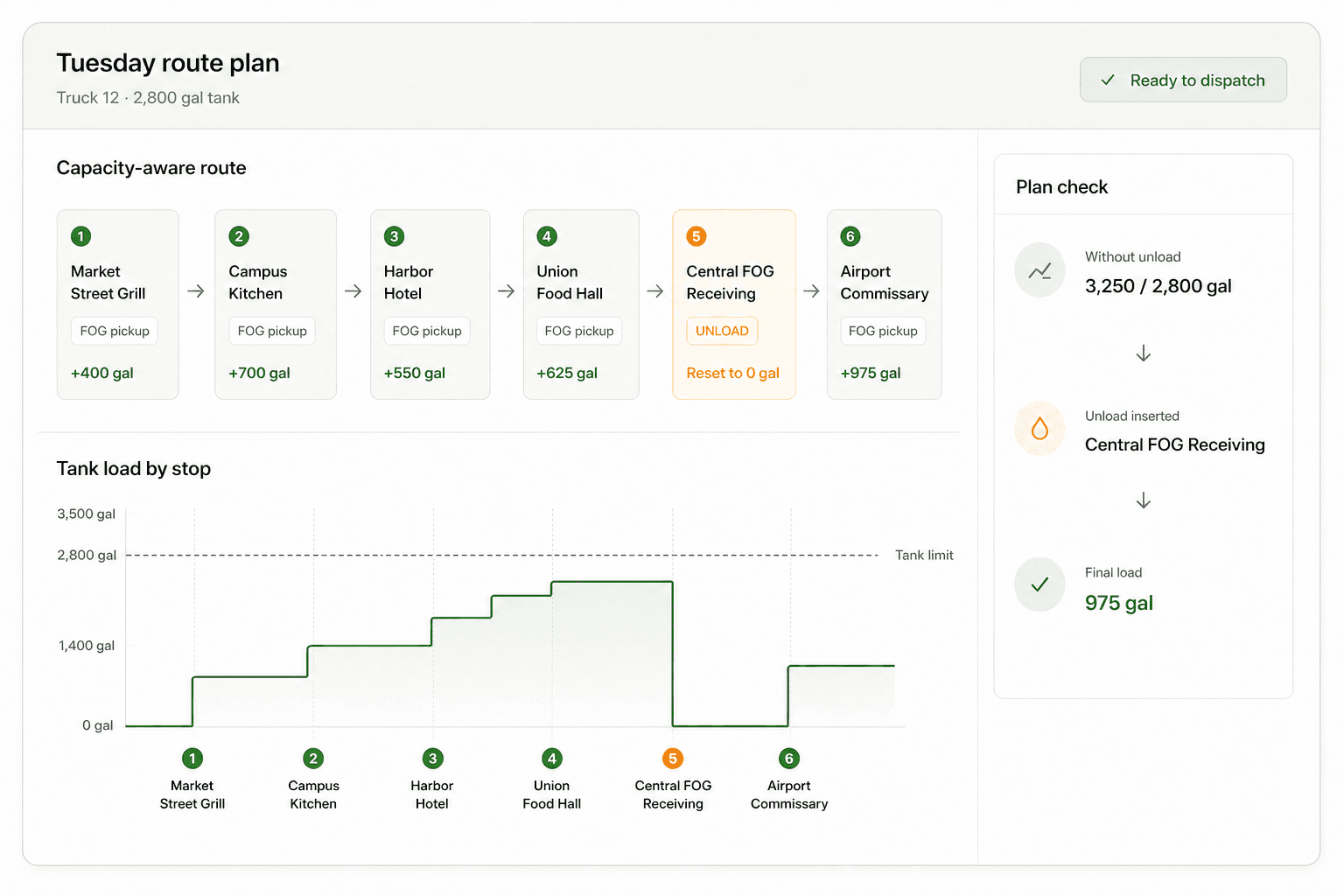
Set capacity in the unit your operation uses, add demand to each stop, and let the plan account for the unload before the route crosses the limit.
A shortest route can still fail when the truck reaches capacity before the final pump-out. DynoRoute plans the gallons and the road together, so the receiving-site return is part of the working day—not an emergency detour.
See estimated load build after every pump-out, so dispatch knows where the limit will be reached before the truck leaves.
Place the unload inside the route with its travel and facility time accounted for—not as an improvised roadside decision.
Keep service windows, disposal cutoffs, truck rules, and driver limits inside the same capacity-aware plan.
Grease trap business software
DynoRoute connects the operational work around grease pumping, so routing does not become another isolated tool for the office to reconcile.
Recurring pump schedules
Create one-time or recurring jobs for every site, assign the right service cadence, and keep due, unscheduled, and overdue work visible to dispatch.
Capacity and disposal routing
Set what each vacuum truck can hold and what each stop is expected to add. DynoRoute plans within those limits and includes the disposal or unload return in the route.
Live grease truck dispatch
See every truck on a live map and timeline. AI suggestions match work by capacity, location, availability, workload, and skills, while dispatchers keep final control.
Driver app and proof of service
Drivers receive the route, site notes, time windows, and stop details on iOS or Android. They can record completion, photos, signatures, notes, and exceptions—even when service is offline.
Customer, site, and trap records
Connect customer contacts, sites, jobs, visits, files, communications, invoices, and custom trap fields. Multi-location accounts stay searchable without flattening every trap into one generic customer record.
Billing and customer communication
Create invoices from finished jobs, track payments, sync accounting data to QuickBooks, and use automated workflows for customer messages, follow-ups, and internal tasks.
Live grease truck dispatch
Dispatchers can see assignments, capacity, progress, and conflicts together. When a restaurant needs an emergency pump-out, AI can suggest the best fit and re-sequence the affected route for review.
From cab to office
Drivers capture the work where it happens. The same completed job can update the customer record, support compliance reporting, trigger a customer message, create an invoice, and continue into QuickBooks.
FOG records and manifests
There is no single universal FOG manifest. Required fields, signatures, copies, reporting, and retention vary by jurisdiction. DynoRoute gives you configurable records, forms, proof, and reports so the workflow can reflect the authorities you serve.
For example, Tampa requires grease haulers to maintain city-approved pumping and disposal manifests. Austin uses multi-copy manifests with generator, transporter, and receiving-facility responsibilities. Florida law defines an originator, hauler, and disposal-facility section with specific service data.
DynoRoute supports the recordkeeping workflow; your local authority determines what is legally required.
One system, four views
Follow jobs, utilization, revenue, overdue work, payments, and team activity from connected dashboards.
Use the map, timeline, job tray, AI suggestions, and conflict checks without rebuilding route context.
Run the route, navigate, see site notes, record proof, and keep working when the signal drops.
Keep customer history current, send documents, create invoices, manage payments, and sync accounting.
Getting started
Start with the data you already have, then configure DynoRoute around your trucks, recurring services, sites, forms, and dispatch workflow.
Map CSV or Excel columns into customer, site, stop, and custom fields.
Add capacity, shifts, start/end locations, service areas, and route rules.
Define recurrence, trap details, job forms, proof, and workflow automations.
Review the route, share it to drivers, and follow the day from one board.
Have a real route, spreadsheet, or dispatch problem in mind? Bring it to the intro call so the conversation begins with your workflow.
Start with your operationGrease trap operator guides
Use the hub to evaluate the software. Use these field guides to work through service frequency, route capacity, disposal, and manifest decisions.
Questions operators ask
Direct answers about route capacity, recurring service, disposal, driver use, compliance records, and accounting.
Grease trap route software helps FOG pumping companies schedule recurring cleanings, build truck routes, dispatch drivers, capture service records, and move completed work into billing. DynoRoute adds capacity-aware planning, so the route can account for what each vacuum truck holds and when it must unload.
You define vehicle capacity and the expected demand at each stop. DynoRoute uses those limits with location, time windows, service duration, driver availability, and other route rules. When a truck needs to unload, the receiving-site visit can be planned as part of the day instead of improvised after the tank fills.
Yes. Jobs can repeat weekly, biweekly, monthly, or on a custom cadence. Dispatch can see upcoming, unscheduled, and overdue work, then group due stops into practical route days.
Yes. Multi-trip planning and vehicle capacity constraints let you include unload or disposal stops in the route. You can also apply service areas, operating hours, time windows, and route locks where the day requires them.
DynoRoute can capture configurable fields, forms, photos, signatures, timestamps, gallons, and disposal details against the job and produce reports from route and proof-of-service data. Manifest formats, signatures, copy distribution, and retention rules vary by jurisdiction, so configure the workflow to the requirements of each authority you serve.
Yes. Drivers can open a route while online, continue working without a signal, save stop status and proof locally, and sync the completed data when the device reconnects.
Yes. DynoRoute supports QuickBooks invoice and payment sync, so completed job data can continue into the accounting workflow without re-keying the same service record.
Yes. Configurable job templates, custom records, forms, vehicle rules, and service types let one operation model different pumping workflows while keeping dispatch, drivers, customers, and billing in the same system.
Reviewed July 19, 2026
Routes that know when the truck is full
Show us the service dates, truck limits, receiving site, and rules that make your day difficult. We’ll start there.
See if DynoRoute fits