Portable restroom operations

Porta potty software for rentals and recurring service.

DynoRoute connects portable restroom scheduling, capacity-aware routing, dispatch, unit records, and billing in one configurable system.

Weekly construction service. Friday event drops. A damaged unit that needs a swap. Give dispatch one place to coordinate the work and drivers the details to finish it.

  • Recurring service schedules
  • Capacity-aware dispatch
  • Unit and site records

Last updated October 13, 2026

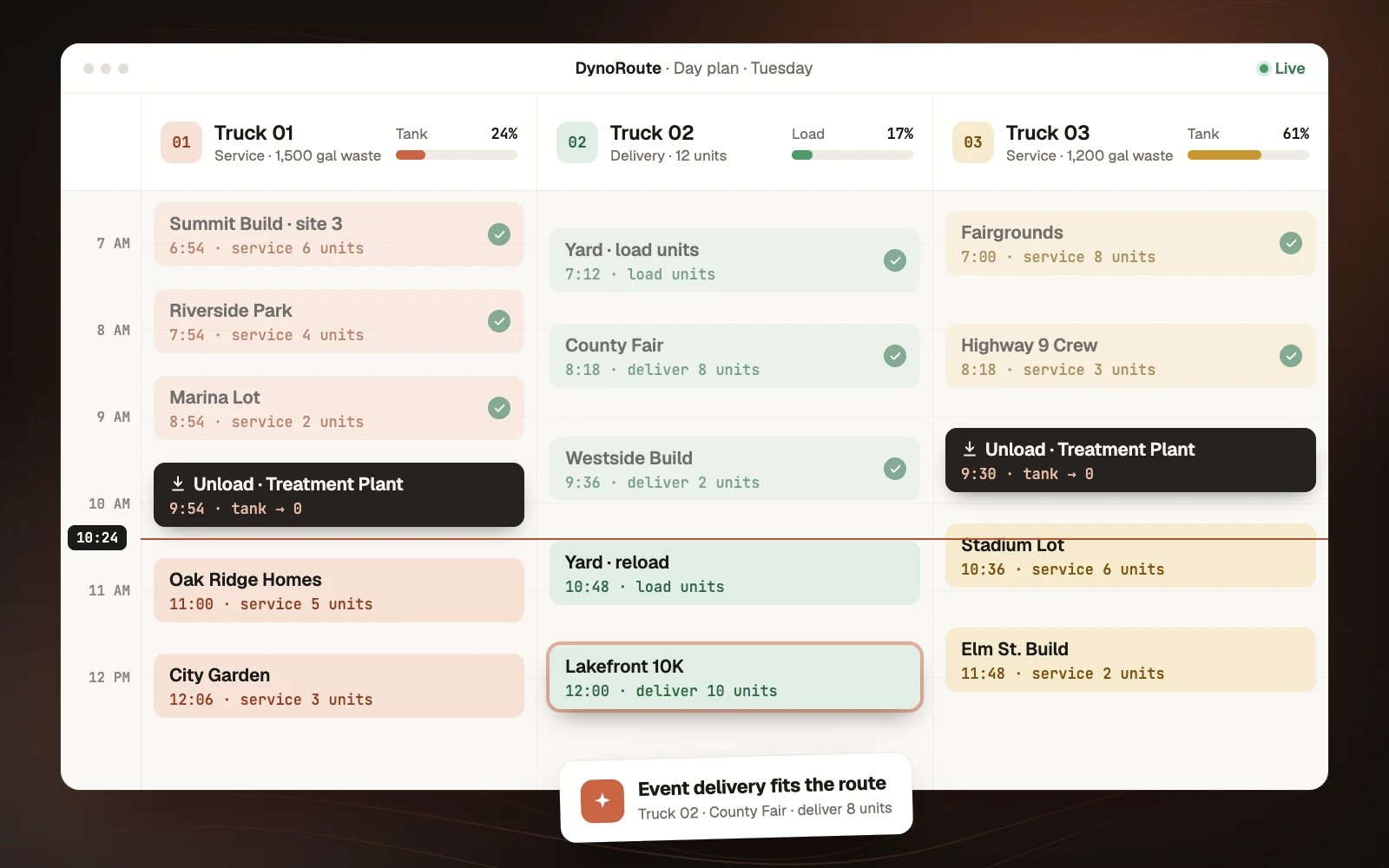
A mixed portable restroom day in DynoRoute: construction service, an event delivery, a damaged-unit swap, and a job-site pickup on one truck with its waste-tank load and unit records

Built around your working day

The service route keeps running when the rental schedule changes.

A new delivery does not cancel the cleanings already promised. An event pickup does not make a returned unit ready to rent again. DynoRoute brings recurring visits, one-off jobs, customer instructions, and field records together so your team can see what needs doing—and what needs attention before it goes on a truck.

One record for the whole dayWhat dispatch keeps in view
  1. 01Recurring cleanings already promised
  2. 02One-off deliveries, swaps, and pickups
  3. 03Customer and site instructions
  4. 04Unit condition before it goes back out

One connected workflow

One operation. Four kinds of work.

Use job types and templates to give each visit the instructions, fields, and charges it needs. Keep the differences visible as the work moves from the office to the driver.

  1. 01

    Deliver

    Record the unit type, quantity, site contact, placement instructions, and promised arrival window.

  2. 02

    Service

    Create repeat visits around the agreed cadence. Capture what was cleaned, pumped, restocked, or inaccessible.

  3. 03

    Swap

    Identify the unit coming back and the replacement going out. Keep the reason and photos with the job.

  4. 04

    Pick up

    Give drivers the unit IDs and access notes. Record returns and condition before the office closes the work.

From dispatch to the office

Portable restroom scheduling that carries through to the invoice.

Keep the service commitment, truck assignment, visit record, and customer charge connected as the day changes.

Recurring service01

Build the service schedule once. Adjust the visit that changes.

Set weekly, multiple-day, or custom service patterns and let recurring jobs generate the visits. Reassign or reschedule an individual visit without rebuilding the series. Add extra service when a site needs it.

  • Site-specific service cadence
  • One-off work alongside repeat visits
  • Upcoming work visible to dispatch
Routing and truck capacity02

Plan the service day around what the truck can carry.

Set vehicle capacity and route constraints, then include disposal returns in the plan. Keep travel, service duration, and driver availability in the scheduling decision. For mixed fleets, review waste capacity, fresh-water needs, and unit-carrying limits together during setup.

  • Capacity limits and unload planning
  • Service windows and working hours
  • Equipment and skill requirements
AI dispatch03

Handle the extra job with the rest of the day in view.

Review AI assignment suggestions with the reasons behind each match. Check availability, skills, location, and workload before sending the job. Schedule-conflict checks flag overlapping work and travel that will not fit.

  • Map and timeline views
  • Reviewable assignment recommendations
  • Dispatcher control over changes
Portable restroom unit records04

Give each unit a record your team can follow.

Configure unit records with an ID, type, site, condition, and status, linked to customers and service work. Define the stages your yard uses, such as deployed, returned, cleaning, or repair. Keep the record current when a unit moves or its condition changes.

  • Configurable fields and stages
  • Customer, job, and visit relationships
  • Unit-specific notes and service history
Driver forms and proof05

Bring back an answer for every service stop.

Attach the right checklist to each job type. Drivers can capture unit IDs, photos, signatures, and exception notes on their phones. Mobile forms also work offline and sync when the connection returns, so a blocked gate or damaged unit has a record the office can act on.

  • Service and condition checklists
  • Photo and signature capture
  • Offline mobile forms
Billing and accounting06

Bill from the work your team recorded.

Create invoices from job line items and review additional service, delivery, pickup, or damage charges before sending. Set recurring billing around the agreement and connect invoice and payment records to QuickBooks Online where included in your plan.

  • Job details carried into invoices
  • Recurring billing and payment tracking
  • QuickBooks Online integration

Unit tracking that reflects the yard

A returned unit has another job before its next delivery.

Create a unit workflow that distinguishes returned, awaiting cleaning, ready, and under repair. Link the pickup record and condition notes so the yard knows what needs attention. Dispatch can then review the recorded status before committing units to the next customer.

Returned unitConfigured workflow
  1. 01Picked up
  2. 02Condition recorded
  3. 03Cleaned or repaired
  4. 04Ready for assignment

Customer communication

Keep customers informed without rebuilding every message.

Use configurable workflows to send service reminders, follow up on outstanding invoices, or create an office task when work changes status. Keep customer messages and job history together, so the person answering the phone can see the same record as dispatch.

Fit for your operation

Bring your hardest rental week to the conversation.

DynoRoute is a fit when you want routing, recurring service, field records, and office work connected around your own operating rules. If your operation depends on 28-day rental calculations, automatic proration, future unit reservations, or simultaneous waste-and-fresh-water optimization, bring those requirements to the intro call so we can check the exact workflow with you.

Getting started

Start with your sites, units, and service commitments.

  1. 01

    Bring your customer list

    Import customer data from CSV or Excel. Review addresses, billing contacts, and existing custom fields.

  2. 02

    Define the operation

    Configure job types, site records, unit fields, truck constraints, and the stages used by dispatch and the yard.

  3. 03

    Test a representative week

    Walk through recurring service, an event delivery, a swap, and a pickup. Check the field record and invoice before rollout.

Published pricing · No per-seat fees · CSV and Excel customer import

Bring a representative week to the intro call and we’ll walk through the setup with your own jobs, trucks, and records.

Operator guides

Practical guides for portable restroom operators

Work through scheduling, dispatch, unit tracking, route capacity, and software fit in more detail.

Service scheduling01

Plan construction service and event turnarounds

Construction units on weekly cadence and event units locked to exact dates run on the same trucks. Here is the due-date logic behind every unit, the five job types on a PRO's board, and how to move one visit without breaking the series.

Read guide
Daily dispatch02

Coordinate deliveries, services, swaps, and pickups

Drop, swap, pickup, and service load a truck four different ways. Here is the resource model behind each porta potty job type, the order for sequencing a mixed day, and the day-end reconciliation that accounts for every unit.

Read guide
Unit tracking03

Build a unit record that follows every movement

Hundreds of units in the field and a yard count nobody quite believes. Here is the unit register worth keeping, the custody events that keep it true through event weekends and construction seasons, and the math on which units actually earn a GPS tracker.

Read guide
Route capacity04

Work out how many units a truck can service

The honest answer is the smallest of three numbers: what the waste tank can take, what the fresh-water tank can give, and what the clock allows. Here is the divided-tank math, the gallons-per-unit forecast, and how to replace the 40-to-50-a-day folklore with a benchmark from your own routes.

Read guide
Software evaluation05

Compare portable restroom software options

Five sanitation suites, two broader rental platforms, and one route-first system compete for portable restroom operators. Every price on this page was verified in August 2026, and the demo test script is built around your hardest week.

Read guide

Running pump trucks for septic work too? The same scheduling, capacity, and records carry over.

See septic pumping software

Questions operators ask

Porta potty software FAQs

Details to help you evaluate how DynoRoute fits your operation.

What is porta potty software?

Porta potty software helps portable restroom operators manage customers, unit records, delivery and pickup jobs, recurring service, driver assignments, and billing. DynoRoute connects those workflows through configurable records, scheduling, capacity-aware dispatch, mobile forms, and invoicing.

Can I schedule construction service and event work together?

Yes. Recurring jobs generate scheduled service visits, while one-off jobs handle deliveries, pickups, swaps, and extra service. You can adjust a single recurring visit without changing the rest of the series. Use separate job types and time windows to keep each commitment clear.

Can DynoRoute track individual portable toilets?

Yes, through configured unit records. Add fields such as unit ID, type, assigned site, condition, and status, then link the records to customers and work. Your team records movements and condition changes through the process you configure; unit records are not GPS trackers.

Does routing account for waste capacity and fresh water?

DynoRoute supports vehicle-capacity limits and disposal returns in the route plan. Portable restroom routes can also depend on fresh water, deck space, and the job mix. Bring those combined limits to the intro call to confirm how they will be represented and checked for your trucks.

Can drivers record service without a signal?

Yes. Mobile job forms support offline completion, photos, and signatures, with synchronization when the device reconnects. Set up the required forms before the route and check synchronization after returning to coverage.

Can I manage recurring rental and service billing?

DynoRoute supports recurring billing and invoices created from job records. You can carry service line items into the invoice and review extras before sending. If you need 28-day cycles, automatic proration, or charges triggered by unit movements, confirm those rules during your evaluation.

Does DynoRoute connect to QuickBooks?

Yes. QuickBooks Online integration supports invoice and payment synchronization. Connection, account mapping, and an eligible plan are required. Bring your current accounting setup to the intro call to check the handoff.

Can I bring customer and unit data from spreadsheets?

Customer data can be imported from CSV or Excel with field mapping. Configured unit records currently need to be created individually. Review the work involved in moving your unit register and service history before switching.

How much does DynoRoute cost?

DynoRoute publishes three flat monthly plans at $199, $499, and $999, with credits for route optimization and other actions and no per-seat fees. The pricing page lists current plans, included credits, and top-ups. On the intro call, we can review your scheduling volume, integrations, and configuration needs so you can evaluate the relevant plan against the way you work.

Start with your operation

Show us the week your spreadsheet struggles with.

Bring your service routes, event commitments, unit list, and billing rules to a 30-minute intro call. We’ll walk through how DynoRoute would fit your operation.